System Architecture & Subsystems
Byte is built on a four-layer hybrid Machine Learning architecture operating natively and 100% offline on macOS.
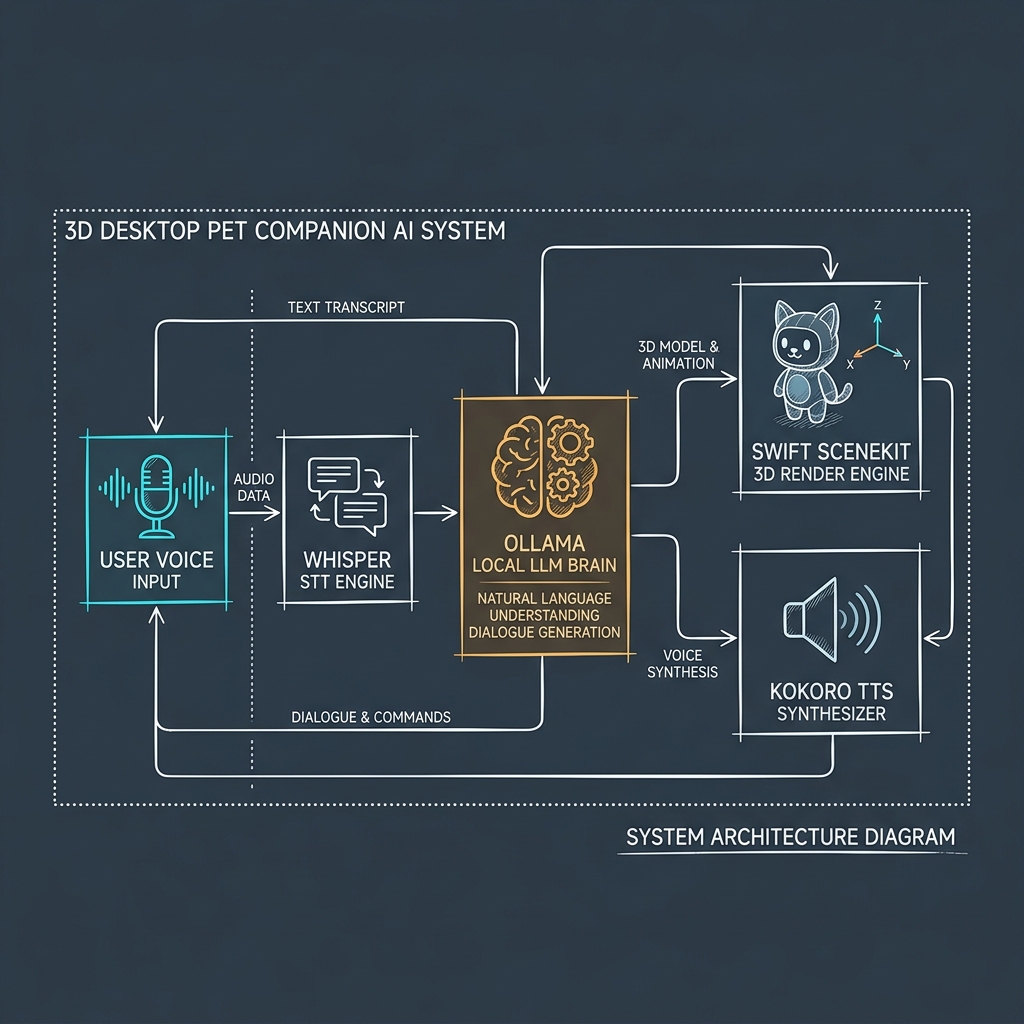
Core Subsystems Breakdown
1. User Voice Input & Speech-to-Text (VoiceInputManager)
- Speech Recognition: Integrates
faster-whisperrunning locally on port9000. - Low Latency: Processes continuous streaming audio from macOS microphone with offline privacy.
2. Ollama Local LLM Brain (byte-llm)
- Endpoint: Ollama service listening on port
11434. - Model: Fine-tuned
byte-llm(based onLlama-3.2-1B-Instruct-4bit). - Structured Prediction: Predicts dual-tag outputs:
[ACTION: sitOnCorner][EMOTION: cozy]- Short natural dialogue (under 20 words).
3. Swift SceneKit 3D Render & Physics Loop (PetScene.swift)
- Rendering: SceneKit 3D transparent desktop overlay.
- Surface Physics: Custom surface collision detection for window top frames, menu bars, and macOS Dock floor.
- Interactive Throwing: Free-form drag and toss physics with drag coefficient and gravity vector calculations.
4. Kokoro Text-to-Speech Synthesizer (tts_server.py)
- Endpoint: Kokoro TTS HTTP server listening on port
8000. - Audio Output: Converts text into humanlike voice synthesis streamed directly to macOS speakers.
sequenceDiagram
    autonumber
    actor User
    participant App as macOS DesktopPet App (Swift)
    participant STT as Whisper Server (Port 9000)
    participant LLM as Ollama byte-llm (Port 11434)
    participant TTS as Kokoro TTS Server (Port 8000)

    User->>App: Voice or Text Interaction
    alt Voice Input
        App->>STT: Stream Audio Data
        STT-->>App: Return Text Transcript
    end
    App->>LLM: Send CONTEXT + USER SAID
    LLM-->>App: Return "[ACTION: sitOnCorner] [EMOTION: love] I'm right here with you."
    App->>App: Trigger 3D Sprite Animation & State Transition
    App->>TTS: Synthesize Text to Audio
    TTS-->>App: Return Audio Buffer
    App->>User: Play Voice Output & Perform 3D Animation